
SmartDispatchDMR
Powerful DMR dispatch application
SmartDispatch
PROFESSIONAL MANAGEMENT OF YOUR CONVENTIONAL DMR RADIO NETWORK
Hytera SmartDispatch is a dispatch application for conventional DMR Tier II networks. It brings together tools to coordinate compatible radio users, according to the components and licenses defined in the project.
Its modular client-server architecture with VoIP support allows voice, data, location and supervision functions to be combined. Features and integrations depend on the version, modules, interfaces and equipment firmware.

Flexible System Deployment
The Hytera SmartDispatch system is IP-based with a modular design and offers an enhanced distribution and deployment platform with customized communication tools such as remote monitoring, voice recording and geofencing. It can be configured as a small single-site system or a large nationwide multi-site network system. All configurations can be easily managed through a remote configuration tool.
ALL TYPES OF VOICE CALLS
Voice calls meet a variety of operational dispatch needs, such as private calls, group calls and all calls. Each client console can access up to 8 voice delivery channels. Through these delivery channels, the system can receive all types of calls as well as initiate any type of call through an easy-to-use, friendly interface.
VOICE RECORDING AND PLAYBACK
Calls covered by the recording configuration are stored on the server. The operator can search records by call date and time or caller ID and play back the audio. Retention, permissions and recorded channels depend on the configuration.
QUICK DISPATCH VIEWER
The operator can perform various functions for subscribers shown on the map, including calls, presence checks, call alerts, text messages and remote monitoring. The current map interface can be saved to open automatically when the client logs in again.
AUDIOLINK
Allows groups, channels, sites or systems to be interconnected through compatible interfaces and gateways. This does not mean that any radios, frequencies or analog and digital modes are directly interoperable.
QUICK GPS
GPS will be transmitted more securely and efficiently when the radio’s “Quick GPS” mode is enabled. The server passively receives GPS reports from the radios, and the operator console can also query GPS.
AUTOMATIC GPS LOCATION QUERY
The server can automatically receive the positions of compatible radios, according to the programming and enabled location features.
TELEMETRY
Allows devices connected to the radio to be monitored and controlled, alerts to be received and their activity to be recorded, according to the enabled interfaces and functions.
LOCATION HISTORY AND ROUTE PLAYBACK
All radio location information will be kept in the system database for later retrieval and checking of location history. Users can view a radio’s location history information and replay its location path within a specified time interval.
TEXT MESSAGE
Dispatchers can send and receive standard DMR text messages. You can send a text message to a radio or a group message to a group of radios identified by their group ID. A chat-based GUI is used to send and receive text messages. All received and sent text messages are stored in the database for later retrieval.
KEYWORD SEARCH
You can search recorded messages by keyword.
EMERGENCY ALARM
When a radio subscriber triggers an emergency, the Hytera SmartDispatch system generates an alarm. Optionally, the location information of the radio triggering the emergency will be displayed on the map based on the validity of its location information at the time the emergency was triggered.
EMERGENCY ALARM PROCESSING - HANDLING
The Hytera SmartDispatch system will automatically receive emergency alarms from radios. The “Take” option confirms that the communication center has been informed of the emergency, while the “Handle” option indicates that the communication center has handled the emergency.
ENABLE / DISABLE UNKNOWN RADIOS
You can enable or disable unknown radios through the radio identifier.
ONLINE / OFFLINE STATUS REPORT
When the radio is turned on / off, it sends a status report to the dispatcher. You can also check the status of any radio with the status query command. This allows the operator to monitor the status of all radios in the system.
REPORTING AND STATISTICS
The Hytera SmartDispatch system can generate various types of reports, such as call, radio status and location tracking reports.
OVER-THE-AIR PROGRAMMING (OTAP)
OTAP (Over-the-Air) features such as radio ID, radio aliases, color code, slot operation, Tx and RX frequency, Rx group list and Tx contacts can be programmed over the air.
DATABASE BACKUP / RECOVERY
The database and recorded files are an important part of the system. To reduce risk and recover data when needed, the Hytera SmartDispatch system offers two ways to back up the database: manual or automatic.
TELEPHONE INTERCONNECTION
Thanks to its standard SIP protocol, it allows integration with the IP-PBX standard for voice interconnection between radios and the public PSTN telephone network. This allows users to divert PSTN / PABX calls through the dispatcher-client console and enables radios to call telephones and vice versa.
INTERCOM FUNCTION
Supports direct communication between client consoles through the Hytera SmartDispatch system. In the client interface, users can choose between one-to-one intercom or simultaneous broadcasting to multiple devices.
REMOTE MONITORING
The Hytera Smart Dispatch System will be able to monitor voice activity remotely without having to press the PTT button. This can be useful in emergency situations when the control center needs to listen to voice activity.
GPS POSITIONING SYSTEM
This feature is available for radio subscribers equipped with GPS. Each radio subscriber can obtain its coordinate information from the integrated GPS module. The Hytera Smart Dispatch System can retrieve any radio’s location information by requesting its current position, sending a Start Polling Command, or configuring the radio to send periodic location updates to Hytera SmartDispatch.
AUTOMATIC GPS SUBSCRIPTION PER CLIENT
When Hytera SmartDispatch system clients go offline, the clients remember radio statuses such as online monitoring and tracking. After a new login, the radio status will automatically be restored from the last logout.
GEOFENCING AND PERIMETER MONITORING
System users can define work or restricted areas on the map for a predefined set of radios. If the geofence rule is violated (depending on whether the area is enabled or restricted), a perimeter alarm will be triggered at the control center and a message will optionally be sent to the subscriber unit.
REAL-TIME TRACKING
Track the location of any radio in real time. Users have the option to show the location route on the map. The polling interval will depend on the polling settings defined for each radio and the load on the DMR system. The total number of tracking activities that can be enabled will depend on the mapping system and system resource limitations.
MULTIPLE MAP SUPPORT
It provides several mapping options for users to select based on their usage requirements. These map engines support online maps such as Google Maps or offline maps such as MapInfo.
SCHEDULED MESSAGES
You can schedule a text message to be sent automatically according to a predefined time. For example, a day, a week, a month, etc.
SEND EMAILS
The Hytera SmartDispatch System server integrates with SMTP and POP3 servers. This allows the dispatcher to send emails from any email client to a radio. Radios can also send text messages to any email address.
OVERSPEED ALARM
When the feature is enabled, the system can issue an alert if the speed reported by the radio exceeds the configured limit.
STUN RADIO
A radio can be remotely stunned. This is a useful feature when it is misused, lost or stolen. The stunned radio can be turned on but will not be able to send or receive transmissions. The administrator can reactivate the radio from the system.
WIDE AREA NETWORK
The server, gateway and subscriber can be deployed throughout the wide area network.
TEXT MESSAGES TO OFFLINE RADIOS
You can send a text message to offline radios. When the radio registers online, it will receive the text message.
REPEATER ACCESS
Using a repeater can reduce the number of gateways required, lowering operating costs and extending communication range. The Hytera SmartDispatch system supports single-station mode and IP connection mode with a repeater.
BATCH IMPORT AND EXPORT
Easily and efficiently import information on radios or workgroups you want to include in the system through an Excel file. Likewise, export existing radio or workgroup information from the system in Excel format.
IP CONNECTION
In addition to connecting mobile radios, repeaters can also be added via IP to use the system as a radio dispatcher. This provides an IP dispatch system that allows network-wide voice recording and direct control of repeater time slots.
MULTIPLE MAPPING ENGINE
Users can choose their own mapping engines based on their specific usage requirements. These mapping engines include Google Maps, MapInfo, Google Offline Map, etc.
MULTIPLE ACCESS PRIVILEGES
Access levels can be assigned based on individual customer needs, to selected radio units or the entire fleet, as well as to specific locations or any location in the system.
MULTIPLE AND SPLIT SCREEN SUPPORT
The Hytera SmartDispatch system console supports multiple views and screen splits across all screens so that all necessary information can be seen quickly. This feature prevents dispatch users from having to switch between different views during operation.
MULTIPLE LANGUAGES
By supporting multiple languages, the SmartDispatch system is ideal for global customers. The display language can be easily changed in the operator console interface without restarting the application.
LOCATION OVER THE DMR NETWORK
Location data can use the DMR network without requiring a cellular data plan for each radio. This does not eliminate possible licensing, infrastructure, server connectivity or maintenance costs, which depend on the proposal.
All products related to SmartDispatch
-
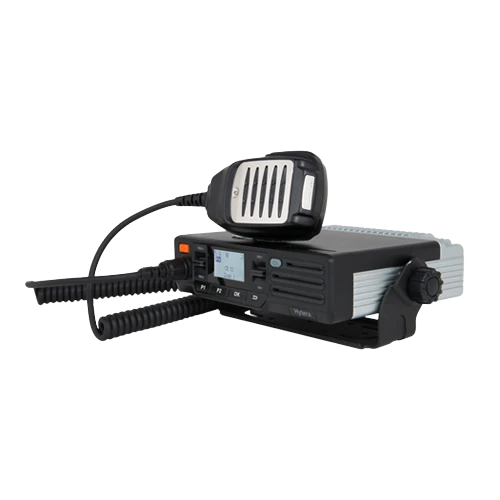 LCD Radio MD626
Sob consulta
LCD Radio MD626
Sob consulta
-
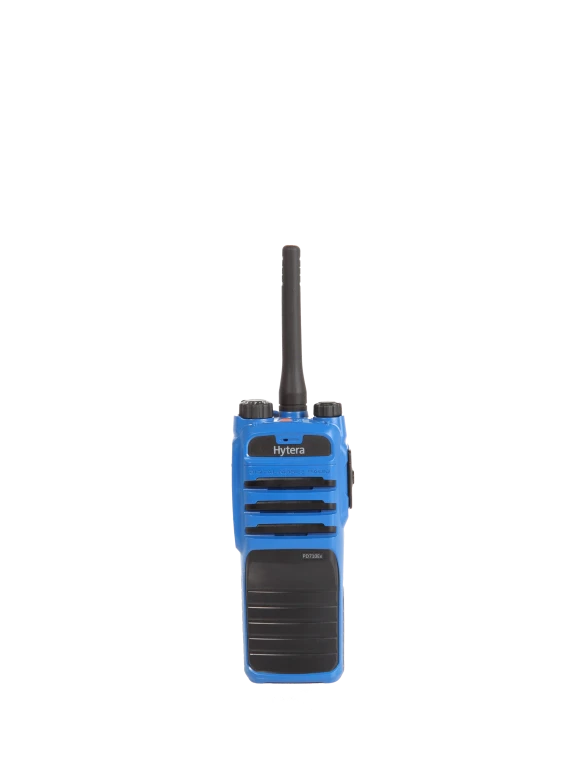 Discontinued Hytera PD716Ex Radio
Sob consulta
Discontinued Hytera PD716Ex Radio
Sob consulta
-
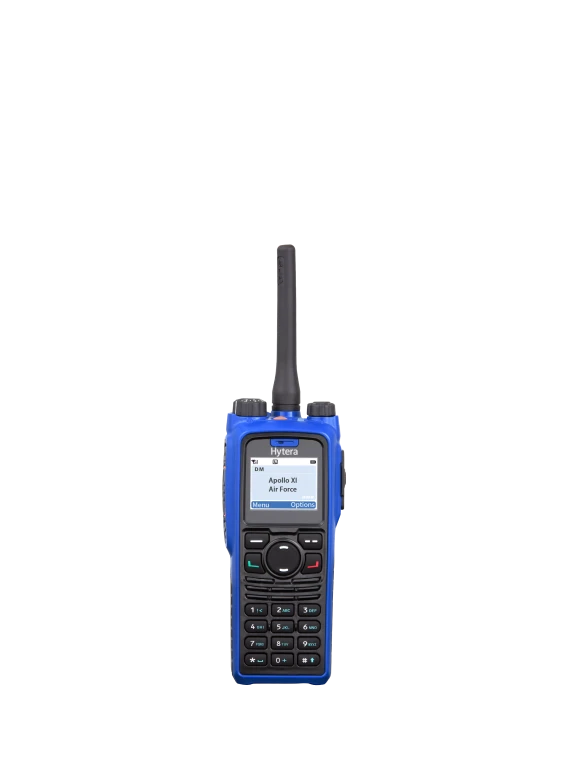 Discontinued Hytera PD796Ex Radio
Sob consulta
Discontinued Hytera PD796Ex Radio
Sob consulta
Find a Hytera dealer to discuss your needs.
Tell us what your operation needs.
Share the details to receive technical and commercial guidance.
Response by email and WhatsApp. No obligation · price on request.