
Motorola Solutions
CommandCentral Aware: a real-time operational view
CommandCentral Aware brings information from different systems together in a shared operational view. Maps, events, resource locations and video help the control center understand an incident and support field teams, according to the integrations enabled.
Discuss this solution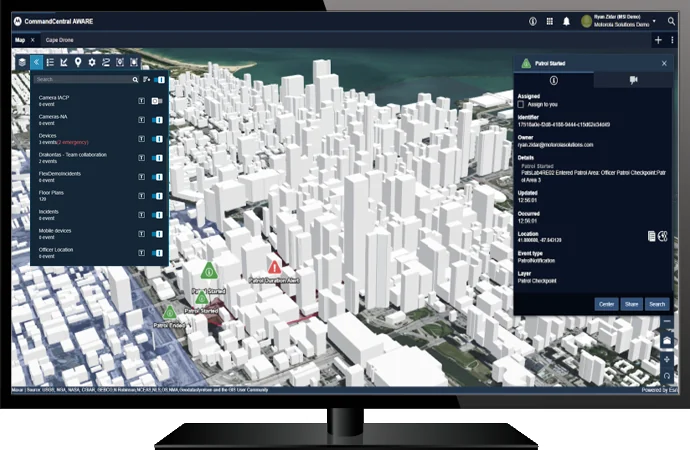
What this solution does
Resource map and location
The Esri base brings together operational layers, units, radios, cameras and incidents. Movement history and virtual geofences broaden the available context.
Events, video and alerts
The control center can monitor event tables, multiple videos and alert rules, including actions linked to emergencies and areas of interest.
Queries and collaboration
Search, historical playback, shared map annotations and per-user permissions support analysis and controlled information sharing.
Areas of interest and verifiable patrols
Beyond showing positions, Aware allows monitoring to be organized by areas and periods. The information depends on the integrated resources and their update frequency; an icon on the map does not prove continuous location transmission.
- Geofences filter resources and events by area and by user or group.
- Directed patrols link units, locations and schedules to checkpoints.
- Alerts indicate entry, exit or non-completion; movement history helps reconstruct the route.
From alert to control center action
The rules engine links events to configured actions. One manufacturer example is activating the camera near an emergency alert, reducing the manual search for relevant sources.
- Event table with columns sortable and configurable by the operator.
- Contextual queries across integrated sources, including VehicleManager, for deeper analysis.
- The MCC 7500E interface allows interaction with talkgroups and status tracking; a compatible console is required.
Where to assess the application
- Control centers that need to correlate incidents, mobile resources and images.
- Public safety teams that monitor events and coordinate the response.
What must be confirmed in the project
- Confirm connectors and compatibility of data and video sources.
- Define connectivity, retention, access profiles and data processing policy.
- Validate licensing and features available for the project and region.
ABC Mais Telecom project
Connect technology to your operational routine.
Describe the current workflow, systems already in use and the problem you need to solve. This conversation guides the integration, deployment and support analysis before equipment or licenses are defined.
Request a project assessment