

Two-way radio technical service: from symptom to diagnosis
The radio stopped working: is it battery, accessory, programming, coverage, or defect? Similar symptoms have different causes. A responsible technical service records the problem, checks the whole set, and only then proposes repair, configuration, or replacement. This guide helps your team preserve useful information and decide the next step without opening the device or wasting time with random attempts.
Before sending: three pieces of information that speed up diagnosis
- Identify the unit. Note brand, model, serial number when available, user, accessories and charging base used. If there are several devices, mark which one failed and which one continues normal.
- Describe the observable symptom. “Does not turn on”, “transmits but does not receive”, “fails only in the dock” and “discharges before the end of the shift” guide different tests. Inform when it started and if there was a fall, water or battery/accessory replacement.
- Record the context. Location, channel/group, time and other affected radios help separate individual defect from coverage or network configuration. For a fleet, inform how many units show the same behavior.
Do not try to change frequency, power or programming to “see if it works”. Besides making diagnosis difficult, operation must remain according to your authorized configuration. If there is a damaged battery, abnormal heating or contact with water, stop use and arrange shipping with the technical team.
Observed symptom is not diagnosis: use this table
| What happened | Useful information to report | What analysis can separate |
|---|---|---|
| Does not turn on or turns off by itself | Charge indicators, battery used, usage time and occurrence of fall. | Battery/charger, contacts, internal power or other defect. |
| Low or distorted audio | Does it occur on the speaker, on the remote microphone or both? Is there noise in the environment? | Accessory, microphone/speaker, audio configuration or physical damage. |
| Transmits, but does not receive | On which channel and with which radios? Is the failure constant or only in one location? | Programming, accessory, antenna, coverage or RF circuit. |
| Fails only underground or far from the base | Simple map of the points where the call works and fails. | Network coverage, antenna, repeater or device condition. |
| Battery lasts less than before | Approximate age, shift, usage mode, charger and comparison with another unit. | Battery wear, inadequate charging or abnormal radio consumption. |
The table guides the report; it does not diagnose at a distance. Swapping components without isolating the cause can mask the failure for a few days and make service more expensive.
From receipt to return: what to expect from service
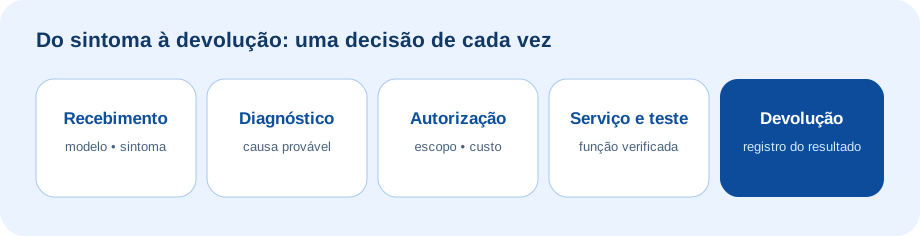
On the ABC technical service page, the process is presented in stages. For the customer, the important sequence is: register the received items, make diagnosis, present the scope and conditions, obtain authorization, execute the appropriate service, test and return with guidance. The record allows comparing the reported symptom with the final result.
Radio, battery, antenna, headset and charger need to be identified. It is not always necessary to send everything; arrange beforehand.
The quote must separate service, parts, feasibility, deadline and warranty conditions. Do not authorize based only on “it seems to be”.
Confirm returned items and tested function. A repaired radio still needs to operate on the network and with the company’s accessories.
When to repair, configure or replace?
Repair makes sense when the cause is located, there is a part, and the remaining useful life justifies the investment. Configure is the way when the hardware works, but channels, groups, or integration are incorrect; the intervention must be done by qualified personnel. Replace may be more rational if the model has lost support, the part does not exist, the cost approaches current equipment, or there are repeated failures. The decision should not ignore accessories and fleet compatibility.
To compare a renewal, see the Motorola R2, Motorola R5 and the Hytera HP506 in the catalog. They are alternatives for study, not automatic substitutes for a defective equipment.
Frequently asked questions
Do I need to send battery, antenna, and charger?
It depends on the symptom. Report all accessories used and agree with the service which items should accompany the unit. A written list avoids loss and rework.
Radio that fails only at one point needs repair?
Not necessarily. Compare another unit at the same location and observe the channel. The origin may be in coverage, antenna, network, or configuration.
Can the service promise the deadline before receiving?
The deadline depends on diagnosis, part availability, and approval. Ask for an estimate and conditions in the proposal, but do not confuse initial triage with a completed report.
Can I clean or open the device before sending?
Perform only external care provided by the manufacturer and stop use if there is damage. The Motorola R2 guide restricts internal cleaning to service with the radio disassembled; repair and adjustments must follow documentation and qualified personnel.
Technical references
Did your radio fail?
Inform model, quantity, and symptom. ABC guides the receipt and next steps without requiring you to guess the defect.
Talk to ABC Mais Telecom
Tell us briefly about your operation. Our team can help you assess equipment, rental or support in Brazil.